



Key Takeaways
- Treat the display as one part of the hybrid-meeting system, alongside camera, audio, conferencing software, and control.
- Use room dimensions and content detail to establish display readability requirements.
- Confirm interfaces, security policies, device compatibility, and user support before deployment.
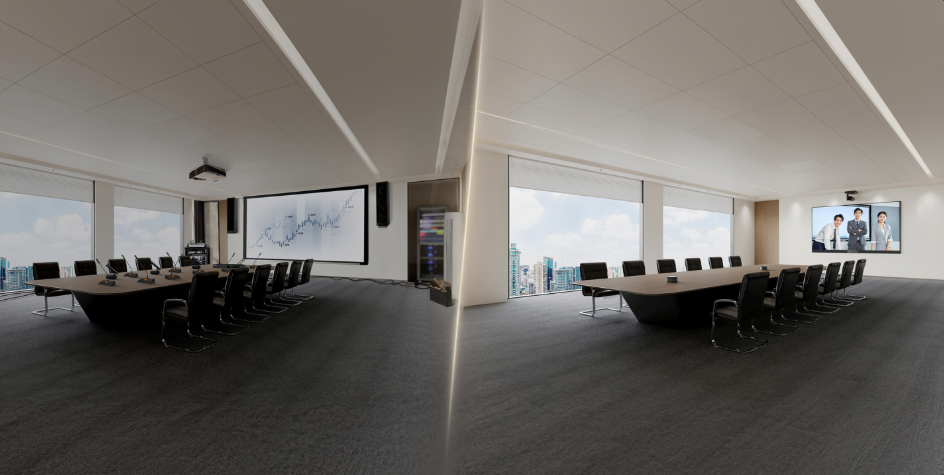
Selection and Planning Checklist
| System element | What to define | Result |
|---|---|---|
| Display | Screen size, viewing distance, resolution | Readable shared content in the room |
| Audio and camera | Coverage, placement, and platform compatibility | Clear participation for remote and local users |
| Control and workflow | Sharing, switching, support ownership | Lower setup friction for recurring meetings |
Hybrid meetings have become an essential part of modern business operations, connecting teams across offices, cities, and countries. As companies continue to adopt flexible working models, choosing the right video conference system has become increasingly important. A professional solution helps businesses improve collaboration, reduce communication barriers, and create smoother meeting experiences.
At QSTECH, we provide advanced display solutions as an experienced all-in-one LED supplier, helping organizations build intelligent meeting spaces with integrated technologies. By combining high-quality display performance with smart collaboration features, we support businesses in creating more efficient and engaging communication environments.
A professional video conference system should deliver clear communication, easy operation, and strong compatibility with different collaboration tools. Instead of managing multiple separate devices, businesses can choose integrated solutions that simplify meeting preparation, reduce technical complexity, and improve productivity.
Key Factors to Consider When Choosing a Video Conference System
The first consideration for a video conference system is integration. Modern meeting rooms require solutions that combine video conferencing, content sharing, audio, display management, and interactive features. A complete integrated system reduces equipment complexity and allows employees to focus on discussions rather than spending time preparing technology.
For businesses, an effective meeting solution should support different communication scenarios. Whether it is a daily team meeting, remote client presentation, training session, or executive discussion, the system should provide stable performance and flexible functionality. A well-designed solution ensures that participants can communicate clearly regardless of their location.
Another important factor is user experience. Touch interaction, wireless screen sharing, and simple controls help teams start meetings quickly. Complicated systems can reduce efficiency because users may need technical assistance before beginning a meeting. An intuitive interface allows employees to operate the system independently and improves overall meeting productivity.
Software compatibility is also essential when selecting a video conference system. Businesses often use different communication platforms and office applications, so the meeting solution should work smoothly with existing software environments. Support for multiple operating systems and external devices provides greater flexibility for future business needs.
As an all-in-one LED supplier, we understand that meeting technology must balance performance and convenience. A high-quality display solution should not only provide excellent visuals but also support efficient teamwork and communication. By integrating multiple functions into one platform, businesses can create cleaner, smarter, and more professional meeting spaces.
X Wall V3: A Complete Video Conference System Solution
At QSTECH, we designed the X Wall V3 to support the needs of modern hybrid workplaces. With the concept of “Meetings Should Be Like This,” this advanced solution enables one-click activation of the meeting environment and simplifies daily collaboration.
Traditional conference rooms often require multiple devices, including displays, cameras, speakers, control systems, and computers. Managing these separate components can increase installation difficulty and create maintenance challenges. The X Wall V3 provides a more efficient approach by combining essential meeting functions into one complete platform.
X Wall V3 Summary
The X Wall V3 integrates six essential systems into one complete platform, including remote video conferencing, wireless screen sharing, intelligent display, audio, intelligent control, and video processing. This all-in-one design helps businesses create cleaner and more efficient conference rooms.
By integrating these functions, the X Wall V3 reduces the need for complicated hardware setups. Teams can quickly launch meetings, share information, and collaborate through a unified interface. This makes it suitable for corporate offices, training centers, executive meeting rooms, and other professional environments.
Powered by Android 13.0 and Windows 10 systems, the X Wall V3 provides an intuitive touch interface for collaborative annotation, video conferencing, and content sharing. It supports creative discussions, training demonstrations, and interactive presentations with smooth operation.
The Windows 10 option supports compatible office and conferencing applications, but buyers should confirm the supplied edition and its current security-support lifecycle. Extended peripheral support allows broader compatibility with external devices and accessories, making the X Wall V3 a flexible video conference system for different business scenarios.
For hybrid workplaces, flexibility is a key requirement. Employees need solutions that support both in-person and remote participants equally. The display supports hybrid collaboration through clear visuals, touch interaction, content sharing, and conferencing functions.
Beyond technology, the X Wall V3 delivers an elegant office experience. It provides an incredible light visual experience solution for modern high-end offices, while its exquisite craftsmanship and sound-absorbing fabric design create a premium environment for luxury workplaces.
The combination of professional appearance and intelligent functionality makes the X Wall V3 more than a simple meeting device. It becomes an important part of workplace design, helping businesses create spaces that encourage communication, creativity, and collaboration.
Building Future-Ready Hybrid Meeting Spaces with QSTECH
The future of business communication depends on technology that can connect people efficiently and naturally. A reliable video conference system helps organizations overcome distance limitations and improve collaboration between teams, customers, and partners.
We at QSTECH are committed to developing innovative meeting solutions that improve business communication. As a trusted all-in-one LED supplier, we combine advanced LED technology, intelligent integration, and professional design to help companies create future-ready collaboration spaces.
Our solutions are designed to meet the evolving needs of modern workplaces. From seamless video conferencing to interactive presentations, QSTECH helps businesses create meeting environments that are easier to manage, more productive, and more engaging.
Upgrade your hybrid meetings with a powerful video conference system from QSTECH. Contact us today to explore how the X Wall V3 can transform your meeting environment and improve teamwork efficiency.
FAQ
What should businesses consider when choosing a video conference system?
Businesses should evaluate a video conference system based on integration, ease of use, software compatibility, audio quality, and content-sharing capabilities. A complete solution helps teams communicate efficiently and manage hybrid meetings smoothly.
Why choose an all-in-one LED display for hybrid meetings?
An all-in-one LED supplier provides integrated display solutions that combine advanced visuals, collaboration features, and intelligent controls. This approach reduces equipment complexity while helping businesses create professional meeting spaces with better user experiences.
How does the QSTECH X Wall V3 improve hybrid meetings?
The QSTECH X Wall V3 improves hybrid meetings through six integrated systems, including remote video conferencing, wireless screen sharing, intelligent display, audio, control, and video processing. It enables faster setup and smoother collaboration.
What operating systems does the X Wall V3 support?
The X Wall V3 supports Android 13.0 and Windows 10 systems, providing intuitive touch interaction, collaborative annotation, content sharing, office application compatibility, and support for professional conferencing platforms and external accessories.
How can a video conference system enhance workplace collaboration?
A video conference system enhances workplace collaboration by connecting remote and onsite teams through clear communication tools. With interactive displays, wireless sharing, and integrated functions, businesses can improve productivity and create more engaging meetings.
Official Product Reference
For current X Wall V3 specifications and available configurations, review the X Wall V3 product page. Product data are subject to change without prior notice.
About QSTECH
QSTECH is a wholly-owned subsidiary of CVTE and provides LED display solutions for professional applications. Product selection should be based on the project environment, content, viewing conditions, installation design, and applicable local requirements.
Project Note
Product specifications and availability are subject to the current official product page and final project configuration. Confirm structural design, electrical work, permits, safety requirements, and local regulations with qualified project professionals before installation.
Contact QSTECH to discuss a display configuration that fits your project requirements.


